Gmail, not IMAP
Apple Mail reaches Gmail over IMAP, so labels turn into folders and Gmail’s search operators don’t apply. Dodosend works with Gmail itself: labels stay labels, and from:, is:unread or has:attachment work as they do in Gmail.
Google doesn’t make a Gmail app for Mac. You can make the website an app from Safari or Chrome, add Gmail to Apple Mail, or install a mail app. Here’s each option, what it keeps of Gmail’s labels and search, and what it costs. We make Dodosend, so it’s one of them.
Free for one Gmail mailbox, on macOS, Windows, and Linux.
Each one suits someone, so the table says who. Prices come from each app’s own site, checked in .
| Option | Best for | What it is | Gmail’s labels and search | Cost |
|---|---|---|---|---|
| Gmail in Safari or Chrome | Gmail’s website as it is, in a window of its own | The website. Safari’s File › Add to Dock (macOS Sonoma or later) or Chrome’s Install page as app gives it a window | Everything, as Gmail does it | Free |
| Apple Mail | Mail from several providers, in the app your Mac comes with | macOS’s own mail app, with your Google account added | Over IMAP: labels show up as folders, and search is the app’s own | Free, with macOS |
| Outlook for Mac | Gmail next to Outlook or Microsoft 365 accounts | Microsoft’s free mail and calendar app, with ads | Labels show up as folders; Gmail syncs through Microsoft’s cloud | Free, with ads; ad-free with Microsoft 365 |
| Thunderbird | Open source, and accounts from any provider | Mozilla’s free, open-source app, for any provider | Over IMAP: labels show up as folders, and search is the app’s own | Free |
| Spark | Several accounts on your Mac and your phone, with a free plan | An email app for any provider, on Mac, Windows and phones | Labels kept as labels; search is Spark’s own, with from:, has: and is: | Free; Plus $10 a month ($99 a year) |
| Canary Mail | Several providers in one inbox, with AI on paid plans | A mail app for Mac, Windows and phones, with a unified inbox; its AI Copilot is on paid plans | Labels kept as labels, several to a message | Free on two devices; paid plans from $36 a year, or $100 once |
| Mailbird | Many providers in one app, with a one-time license on offer | An app for Windows and Mac that gathers Gmail, Outlook, iCloud and other accounts | Over IMAP, which has to be turned on: labels show up as folders | Free for one account; Premium yearly or a one-time license |
| eM Client | Mail, calendar, contacts and tasks in one desktop app | A desktop suite for any IMAP, POP or Exchange account, with calendar, contacts and tasks | Over IMAP, with Google sign-in: labels come in as tags | Free for home use, with two accounts; Personal $24.95 a year or $39.95 once |
| Mimestream | Gmail in a native Mac app, if a subscription suits you | A native Mac app made for Gmail; an iPhone version is in beta for subscribers | Kept as Gmail has them | $4.99 a month or $49.99 a year, after a 14-day trial |
| Superhuman | Gmail and Outlook from the keyboard, with AI that writes, at a premium | A keyboard-first app for Gmail and Outlook, with AI that writes | Kept as Gmail labels; from: and has:attachment work in search | $30 a month, or $25 billed yearly; no free plan |
| Shortwave | An AI assistant over your Gmail, with a free plan | An AI email app built on Gmail, for Mac, Windows and phones | Labels kept and synced both ways; its own search, with from:, label: and is: | Free, with a Shortwave signature; Pro $18 a month |
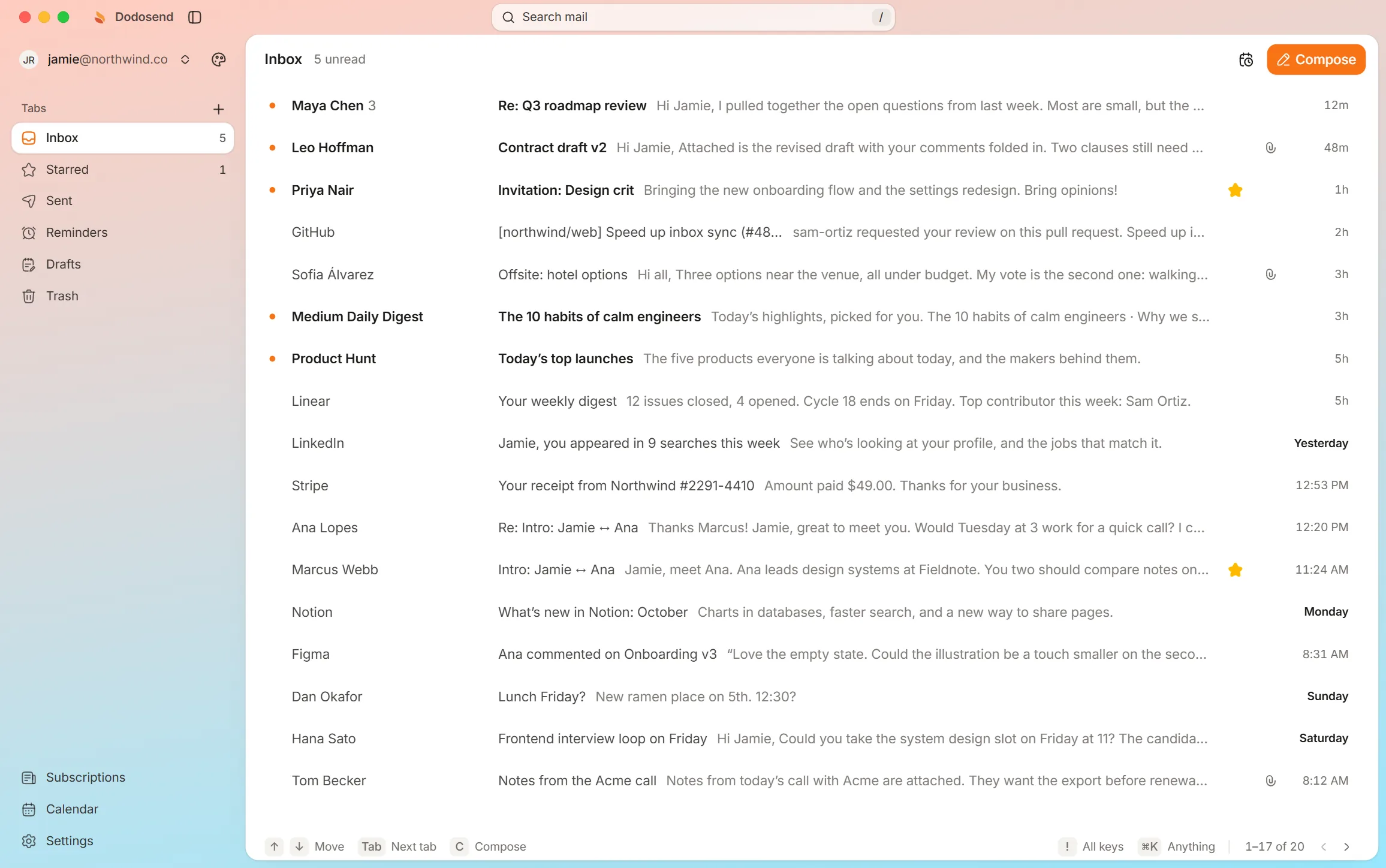
| Dodosend | Gmail from the keyboard, on Mac, Windows or Linux | A desktop app made for Gmail, run from the keyboard | Kept as Gmail has them: labels stay labels, and from: or has:attachment work | Free for one mailbox |
Older lists still recommend Notion Mail, whose inbox shut down on September 22, 2026. The Mac App Store’s apps with “Gmail” in their names come from other developers, not Google: some put Gmail’s website in a window, others are mail apps of their own.
The app’s own keys, on sample mail, right in this page. Press them yourself, or let the guide show you. Nothing here touches a real mailbox.
Interactive demo. A hands-on look at how it works: use your keyboard or mouse, and the guide shows you what to do. The mail is made up.
10 threads
Press ↓ to move to the next thread.Tap “Show me” to move to the next thread.
Move, star and archive from the keyboard. Nothing is final: undo brings it back.
Everything Gmail already knows about your mail, in a desktop app you run from the keyboard.
Apple Mail reaches Gmail over IMAP, so labels turn into folders and Gmail’s search operators don’t apply. Dodosend works with Gmail itself: labels stay labels, and from:, is:unread or has:attachment work as they do in Gmail.
⌘K opens the palette, ⌘↩ sends, ⌘Z undoes, ⌘W closes a tab. Every shortcut uses ⌘ on a Mac and Ctrl everywhere else.
Its own window and Dock icon, and the keys a browser tab keeps for itself: ⌘W closes a Dodosend tab, ⌃Tab moves to your next mailbox.
G then C opens your week, 0 shows today beside the inbox, and ⌘⇧A pastes your free slots into a draft as a sentence.
Turn on Open email links in Dodosend, under Settings › Email links, and an email address clicked in Safari or any other app starts a new Dodosend message to it.
The Dock icon counts the inbox conversations with something new since you last looked, across every mailbox you’ve connected. Bring the window forward and it clears.
If the website is all you need, Safari or Chrome can make it an app, with its own window and Dock icon. A Safari web app keeps its cookies apart from Safari’s, though it usually opens signed in, and it shows notifications, with their count on its Dock icon, once you allow them in the web app itself. It’s still Gmail’s website inside, run by the browser, and most of Gmail’s single-key shortcuts stay off until you turn them on in its settings.
Apple Support: Use Safari web apps on Mac
Chrome Help: Use web apps
Apple Mail adds Gmail as a Google account and reads it over IMAP, the protocol most mail apps use. All your mail is there, but Gmail’s labels and search work differently.
Sources: Apple Support, Add and manage email accounts in Mail on Mac; Google for Developers, IMAP Extensions; Gmail Help, Choose your IMAP email client settings for Gmail; Google Workspace Help, About IMAP and POP clients.
Every Mac build is on the download page, free for one Gmail mailbox.
At sign-in: While Google reviews Dodosend, it may say it hasn’t verified the app: choose Advanced, then Go to Dodosend.
No. Google makes Gmail for the browser and an app for iPhone and iPad, and that app isn’t offered on the Mac, even one with Apple Silicon. Safari’s Add to Dock or Chrome’s Install page as app makes gmail.com a web app with a window of its own, but it is still the website.
Google makes none for macOS. Since macOS Sonoma, a Mac can show widgets from apps on your iPhone, under System Settings › Desktop & Dock › Use iPhone widgets, but a widget from an app that’s only on the iPhone asks you to open it there to continue.
Yes. There are separate builds for Apple Silicon and Intel Macs, both for macOS 12 Monterey and later.
Apple Mail is a general email app that reaches Gmail over IMAP. Dodosend is built for Gmail alone, from the keyboard: labels that stay labels, a search that reads Gmail’s common operators, a command palette, reminders, scheduled send and your Google Calendar.
Not yet. Its Dock icon counts the inbox conversations with something new since you last looked, across every mailbox, and clears when you bring the window forward.
Yes. Dodosend shows one mailbox at a time, and ⌃Tab moves to the next. One mailbox is free; the Multi-mailbox plan, billed monthly or yearly, connects more. The guide to managing several Gmail accounts compares the other ways too.
Yes, for one Gmail mailbox, with every feature. The Multi-mailbox plan, billed monthly or yearly, is for connecting more than one. Dodosend is in beta, and the download is open to everyone.
Your labels, your search, your calendar, and a key for everything. Your mail stays on your computer, and Google lets you revoke access anytime.
Free for one Gmail mailbox, on macOS, Windows, and Linux.